
Infrastructure for Studios
What a 1-year rabbit hole taught me
 Andress Martin
For this very post to exist, there's more going on behind the scenes than most people imagine. Not trying to brag, but it's a lot of work, so make it count. 🙄
Jokes aside, we don't often stop to really consider everything that's needed for a business to become operational and professional.
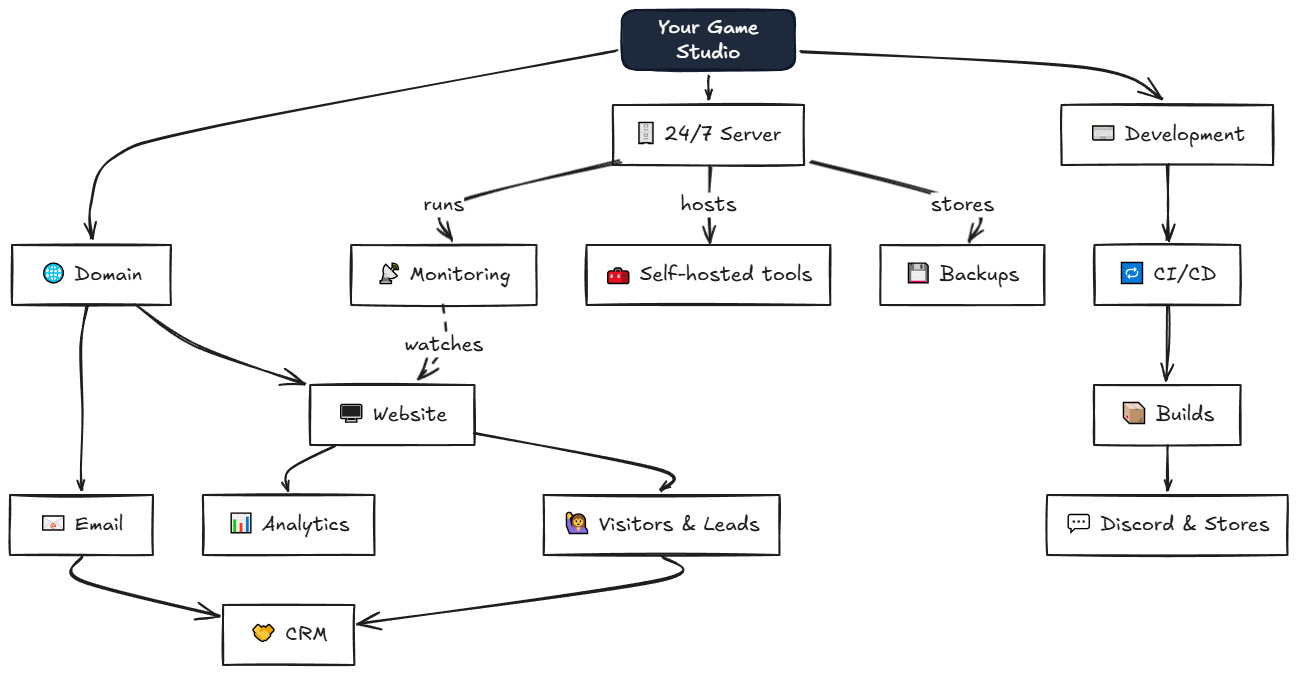
Let me walk you through the rabbit hole I dove into in 2025. I started discovering what we call Process Engineering (in practice) when I needed a domain, madeinbugs.com.br, especially for grants and festivals. With the domain, I found out we could now have custom emails, like andress@madeinbugs.com.br. Fancy, right? And with the emails, we started using Cloudflare for a bunch of conveniences and security measures, even improving how we organize our inbox. And with Cloudflare, it didn't take long before we started feeling the need for a 24/7 server for the studio.
And like every bottomless pit, being the good overcomplicator™ that I am, one thing led to another and I ended up opening Pandora's Box.
But setting up a server, installing tools, handling security — it's complicated, and each service has its own login, its own terms of service, its own quirks.
Let me share a bit of what I learned, from the useful to the "interesting", hoping it can help you on your own journey of professionalizing your studio. Let's go!
Let's Get the Terms Straight
At Made in Bugs, back in 2024, we had no processes for almost anything.
- Showcasing your game? How will you store the contacts of the people who got interested?
- Posting on social media? How about scheduling them days in advance?
- Making builds? How about publishing the errors or the link straight to Discord?
- Talking to publishers? Wouldn't it be nice to know if they even opened your link?
Let's start by defining what each thing is. Keep in mind that each term is a link to a more complete description, with images and examples:
Domain — Your domain is your identity. With it you set up professional emails and subdomains for internal tools.
Email — "I know what email is 🥱". Well, yes, but there are two types of email. Did you know that? 🙄
Transactional ones are the automated emails (account confirmation, purchase receipt). Marketing ones are the newsletter, the announcements. They're separate systems, with different rules, different providers.
Why does this matter? If you end up mixing the two above, your emails will land in the spam folder, because providers like Google check how much your emails are being opened or ignored before categorizing them.
Analytics — How many people visited my site? Where did they come from? Which page performed best?
CRM — "Customer Relationship Manager" — it's for organizing your contacts, your conversations, your leads. When someone emails you asking about a partnership, you have to store it somewhere. A spreadsheet is already a good start, but there are dedicated tools for it.
CI/CD — Continuous Integration, Continuous Delivery. Every time you make a big change, the system automatically tests, builds, and deploys. It's great because, even if you don't need to ship to stores yet, you can have a pipeline that sends the build to whoever you want, like to your Discord server, making testing easier. Example.
Backups — I started getting paranoid about backups after I found out that the average lifespan of consumer hard drives is 3 years. I'll talk more about this soon.
Monitoring — Your site went down at 3 AM. An automation failed. When do you find out? Uptime monitoring is having a service watching over a series of code, applications, and websites for your company.
"Free"
You're probably thinking you'll soon be spending $300/month on everything I described. The worst part is that Yes, but at the same time No, because it depends on the path you choose. There's the "free" route, as long as you have time and knowledge:
Self-hosted and Open-source
Self-hosting is the act of hosting your applications on your own server. We're usually talking about open-source applications. A dedicated server can cost you around $20-50/month. On it you install everything, your data is yours, and so is all the work.
At first the learning curve can be brutal. Docker, nginx, SSL certificates, DNS records, etc.
- Just starting out, team of 1-2? You probably don't need to worry much about this stuff yet. Big companies' apps and their free tiers will serve you well. But if you want a hobby, start with what I consider the bare minimum in infrastructure.
- Sensitive data? Self-hosted is highly recommended, so you know exactly where your data lives.
But it's absolutely worth it. Suddenly you find out you no longer need Google Drive, Google Photos, Dropbox, OneDrive, none of that.
Some Cool Tools
Let me share some highlights I can't live without anymore:
Social Media Manager
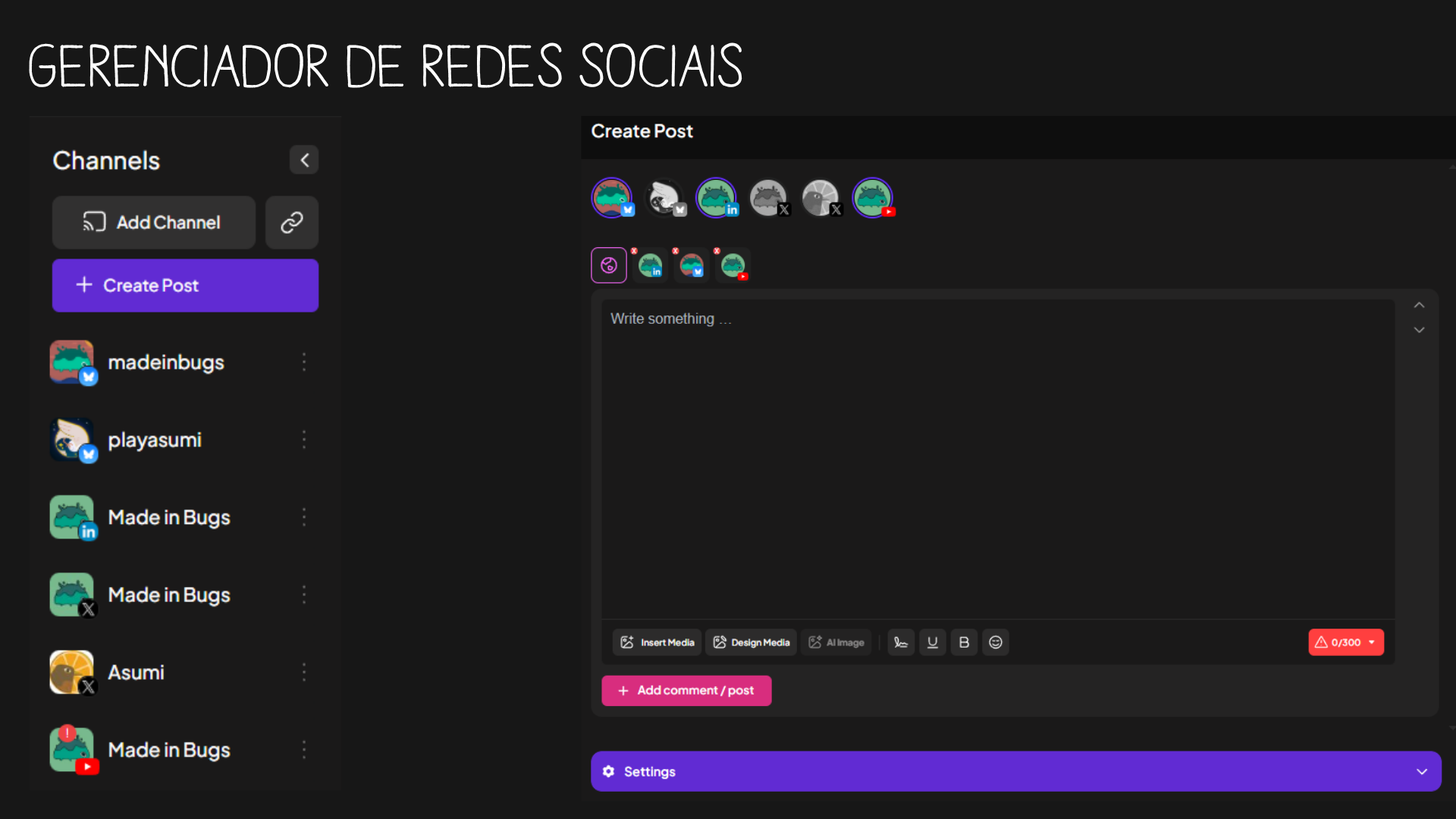
Post scheduler straight from your PC, allowing multiple posts at once
Automation
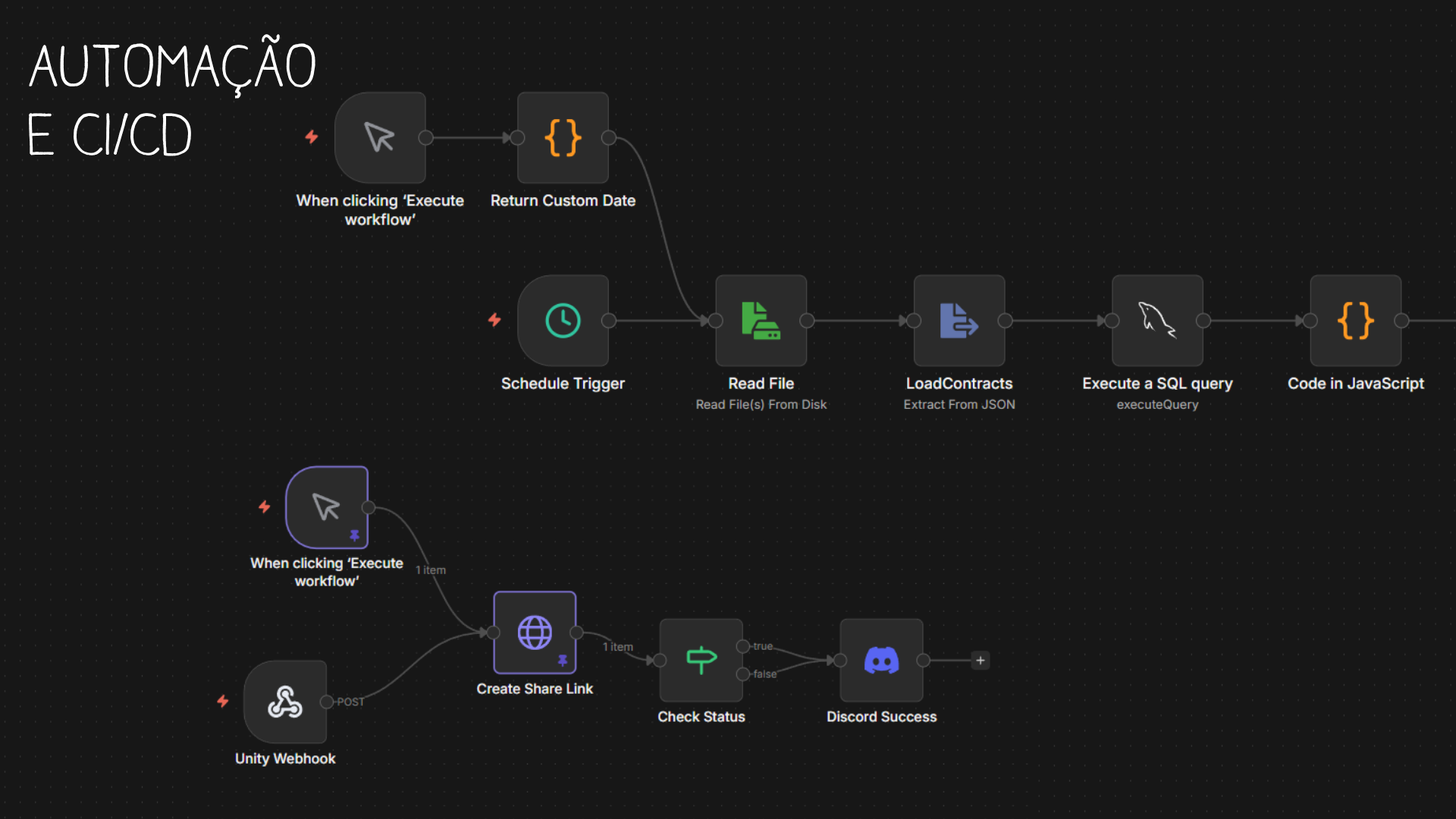
Automatic builds, Discord notifications, automatic emails, and much more
Link Snitching 👀
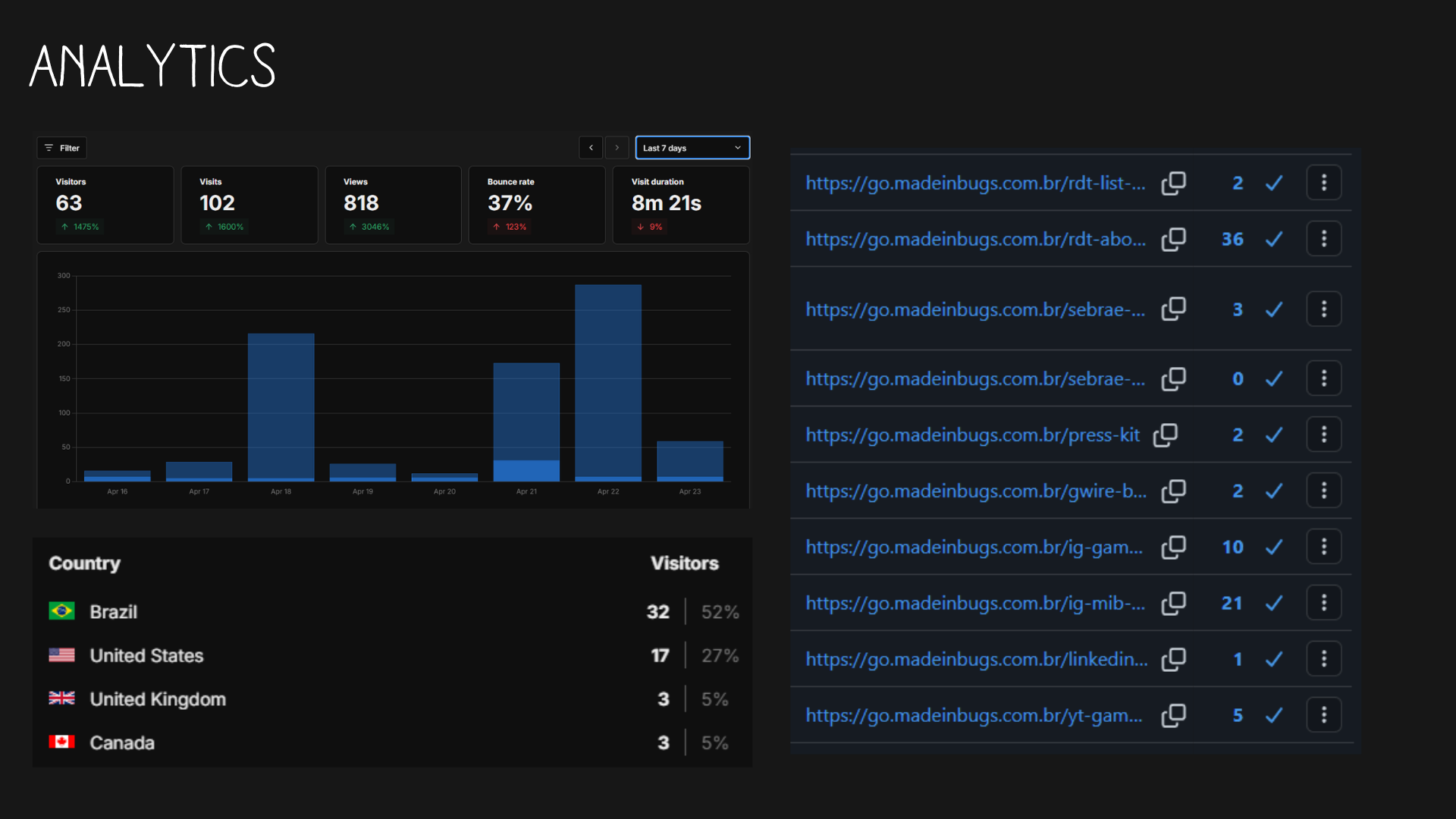
Find out whether people are clicking — or not — on your links and call-to-actions
Obsidian as Documentation
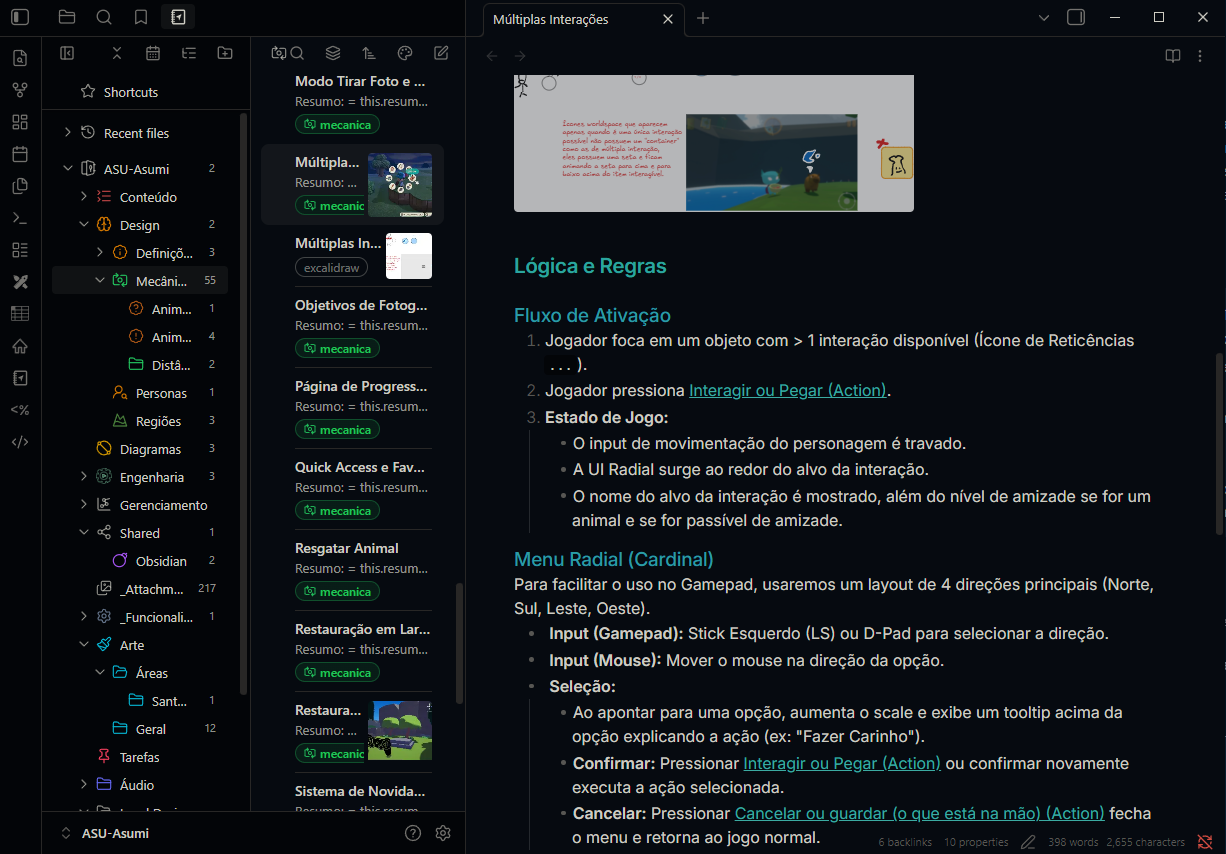
The studio's documentation self-hosted in Obsidian, with shared plugins and tools.
And those were just a few examples. I've got more on my Infra Builder (premature little plug 👀).
Speaking of Backups
I promised I'd come back to this. Nobody values backups until they lose everything. In practice, there are a few options that complement each other, and I do all three in my studio:
Cloud backup — Your data replicated in third-party datacenters (AWS S3, Backblaze, Google Cloud). You pay by volume and trust your data to another company.
Local backup (server or NAS) — A NAS (Network Attached Storage) is, in practice, an enclosure with several hard drives connected to your network, working like a private "Google Drive". It's fast and stays under your control.
Disk mirroring — This is what we call RAID 1, where two drives of the same capacity receive exactly the same data at the same time. A controller (on the motherboard or via software) duplicates every write to both disks. If one burns out, the other has a complete copy.
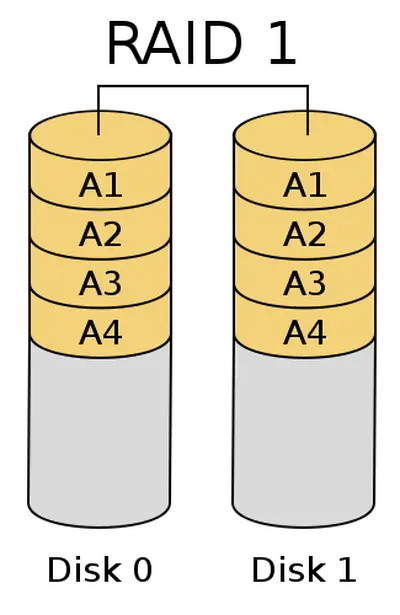
The structure of a disk mirroring setup
Calling RAID 1 a backup is technically wrong — it's a defense. It protects against the physical failure of a disk, not against you deleting a file by accident — because the deletion is mirrored to both drives instantly.
When feasible, the golden rule is still the 3-2-1: 3 copies of your data, on 2 different media, with 1 of them off-site.
Opening the Doors (Carefully)
Alright, you've got a server running at home. But how do you let your team — or the world — access it without exposing yourself?
Reverse proxy (Nginx) — A reverse proxy like Nginx receives all the traffic at a single point and routes it internally to the right application, plus it hides your internal structure.
Mesh networks (ZeroTier, Tailscale) — Tools like ZeroTier and Tailscale create a virtual private network between your devices, as if they were all on the same LAN.
Cloud server (VPS) — Providers like AWS, Oracle Cloud (which has a generous free tier) rent you a machine that's on 24/7. You get the control of your own server without worrying about power or internet dropping.
The reality is that installing the tools is 20% of the work. The other 80% is maintenance. Vulnerabilities, expired certificates, and bugs — lots of bugs — can happen. Sometimes the server itself can crash (which is why it's also nice to have a 24/7 activity monitor!)
What I'd do differently 💡
- Start with the basics — Domain + professional email + analytics.
- Document EVERYTHING — Build a database with your learnings and recurring commands.
- Automate maintenance early — Automatic security updates and notifications.
- Have a disaster plan — What if your server catches fire? (bizarrely, it can happen)
One last thing...
After spending 1 year learning, we turned all that knowledge into a service: the Infra Builder.
It's an interactive configurator where you choose what you need and we build it for you. If that interests you, take a look. Leave the boring part to us and focus on the part you love: making games. And if you'd rather build everything yourself, I hope this post gave you a great starting point. 💚
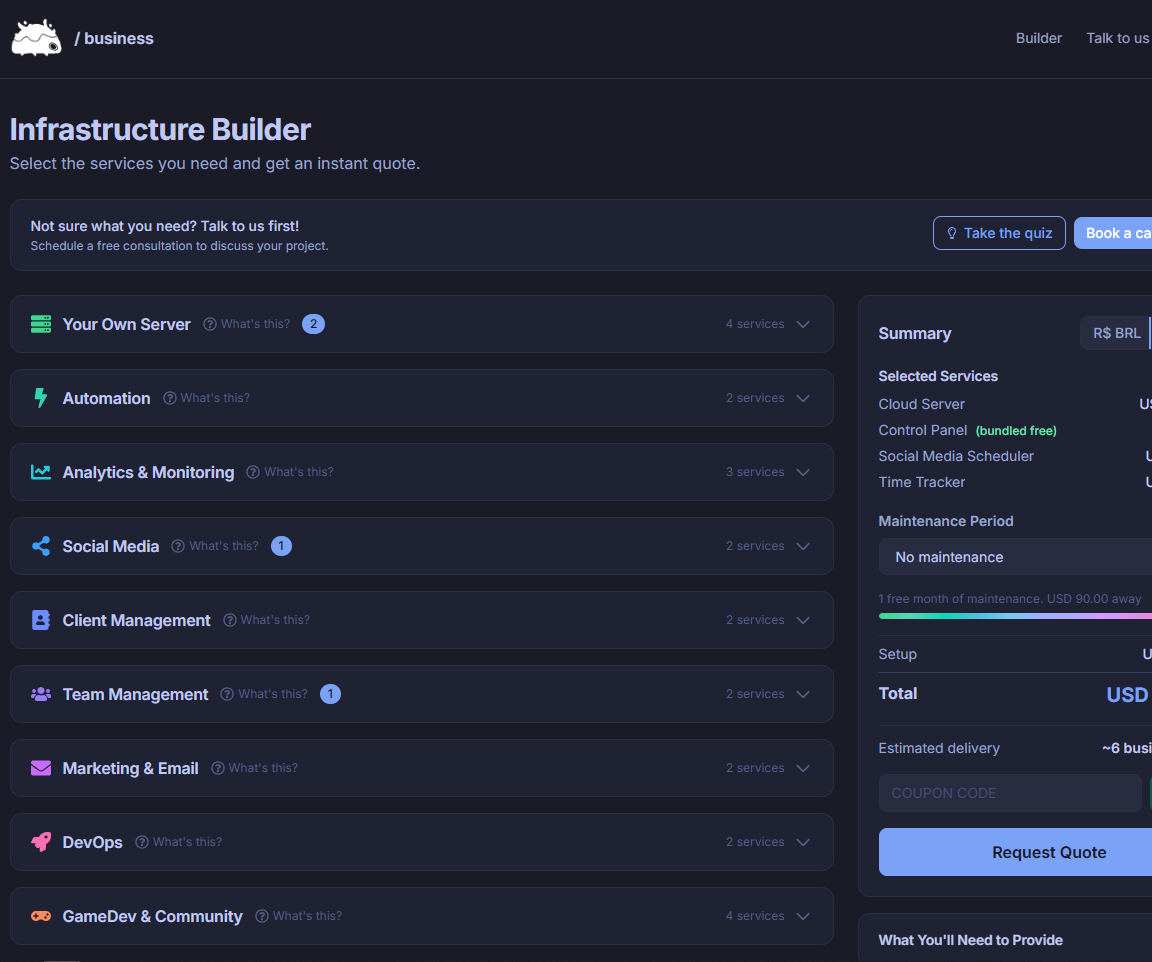
Thank you so much for reading this far. For the real ones, we created a discount just for you if you want to hire our infra services: SUPERBLOGPOST. Just enter it at checkout.
~ Cheers, and happy gaming.